
Practical guide
Managing a restaurant waitlist well isn't about getting more people to wait at the door. It's about turning demand you can't seat right away into occupied tables, with credible times, clear communication, and real coordination across reservations, the dining room, and the kitchen.
Short answer: a waitlist works when it records essential data, calculates a realistic wait range, keeps in contact with the guest, protects upcoming reservations, and measures the final outcome of every party. If it doesn't close the loop with statuses and metrics, it's just a queue full of names.
In 60 seconds
How to manage a restaurant waitlist without losing tables:
- Record the time, name, party size, phone number, preferences, suggested table, notification time, status, and notes.
- Split the queue by party size, area, and real compatibility.
- Give time ranges, not exact figures.
- Define a notification channel and always use it with the same rule.
- Set a grace window after notifying so you don't block tables.
- Read the waitlist alongside the reservation book and the table layout.
- Measure waitlist-to-table conversion, walk-offs, and the gap between promised and actual time.
When a restaurant takes in walk-in guests and concentrates much of its intake at peak hours, the wait stops being a front-desk detail. It becomes a critical part of operations, where gaps are recovered, walk-offs are reduced, and intake is organized. When that system doesn't exist, the consequences show up fast at the door: friction, broken promises, and empty tables that could have been filled.
At Plattio we work with restaurants that manage reservations, waitlists, orders, table layout, and service metrics from a single system. That experience lets us see recurring patterns: how many parties leave the door when there's no promised time, how many tables are lost for lack of coordination with reservations, and how many walk-offs are avoided when the notification arrives through the right channel.
In day-to-day operations, the pressure at the door and walk-in guests have stopped being an exception and become a stable part of demand that needs a system, not improvisation.
How this guide was created
This guide combines operational criteria used by front-of-house teams with the patterns we see when we connect reservations, the waitlist, the table layout, orders, and analytics in Plattio. There's no universal walk-off or conversion percentage that works for every restaurant: it varies by average ticket, type of cuisine, time slot, weather, location, party size, and reservation culture.
That's why we don't give falsely precise benchmarks here. The right approach is more useful: define the protocol, record the fields that let you analyze it, and compare each restaurant against its own history by day, time slot, and party size.
The protocol can be activated with no software cost if you start with paper or a spreadsheet. The real cost appears when you need to automate notifications, connect the waitlist with reservations, and measure results without manual review.
What you should take away from this article
In this guide you'll find three clear blocks:
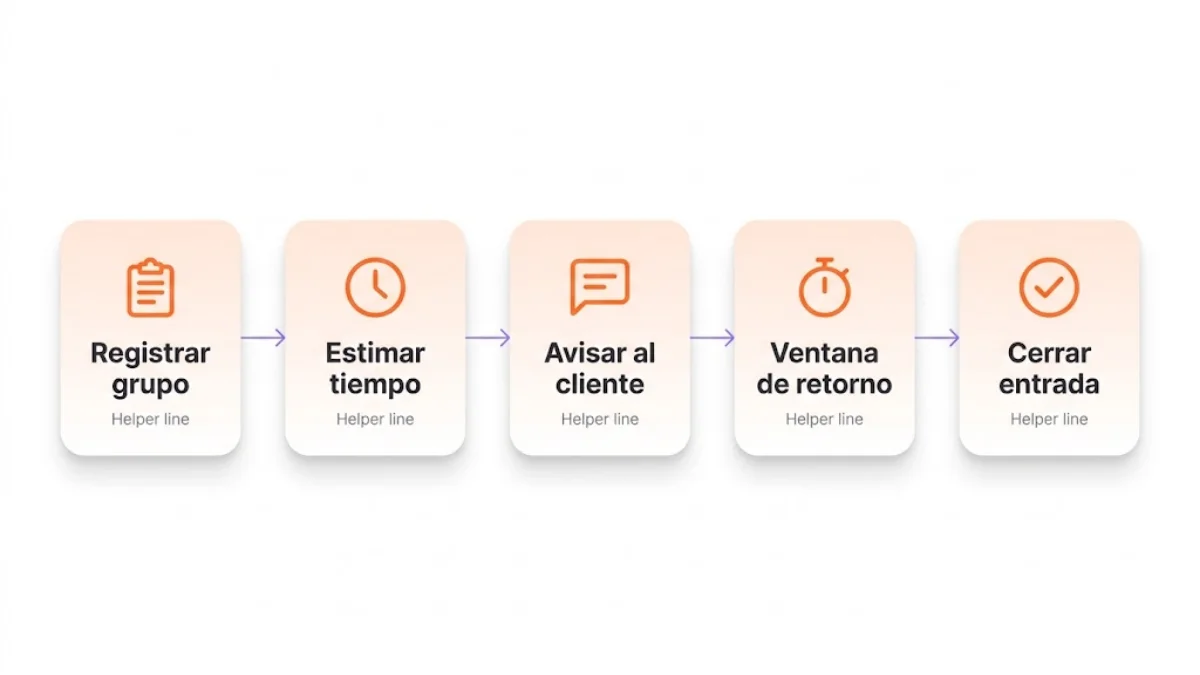
- Process: how to organize the waitlist from the guest's arrival to the final status (seated, canceled, no response, or walk-off).
- Criteria: how to estimate times without over-promising and how to decide which party to seat first without breaking reservation logic.
- Measurement: which key metrics to review to detect whether the waitlist turns demand into occupied tables or just piles up names.
- Template: which minimum columns and statuses to use so the waitlist is auditable after service.
What a waitlist is in a restaurant
Restaurant waitlist: an operating system for recording parties without an immediate table, estimating their wait time, notifying them when there's capacity, and measuring how many end up seated.
It can be manual, digital, or integrated into a reservation and table system. What matters isn't the medium, but the operational logic: who comes in, what's promised, how they're notified, how long the table is held, and what outcome is recorded.
A mature waitlist isn't just a first-come order. It's a decision layer that cross-references immediate demand, real availability, committed reservations, table times, and the communication channel. The more pressure there is at the door, the more important it is that this decision doesn't depend on memory, gut feeling, or whoever shouts loudest.
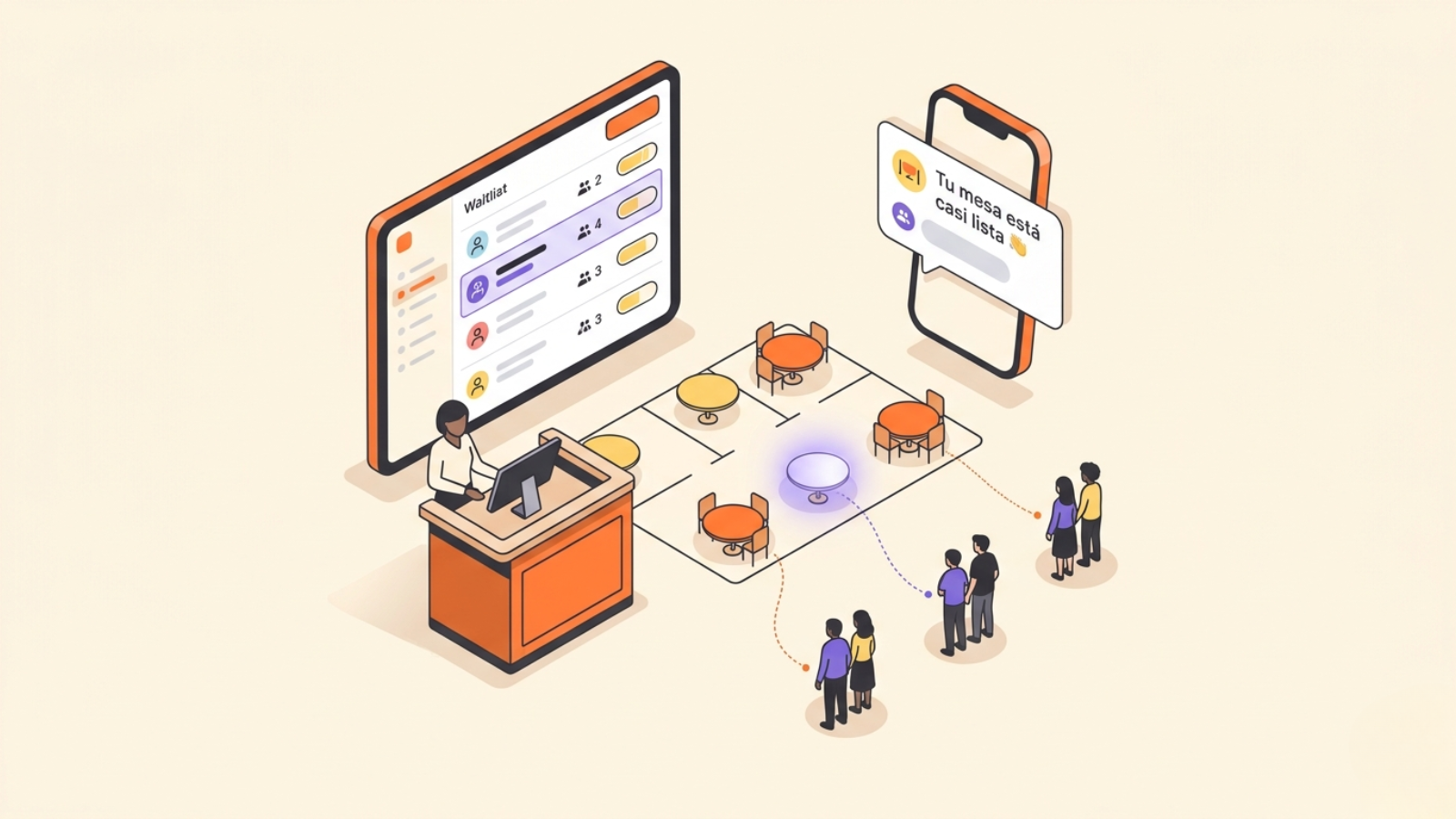
In digital waitlist flows, that logic usually shows up as guest notifications, QR sign-up, time estimation, and final statuses. In practice, the goal is for the guest to know how long is left and to be able to move around without disappearing from the team's radar.
A waitlist, a physical queue, and a reservation are not the same thing
These three concepts often get blended together, but they answer different problems.
Concept | What it solves | Horizon | Risk if it fails |
|---|---|---|---|
Physical queue | Visually orders who is waiting at the door | Immediate, no information | Tension at the door and silent walk-offs |
Reservation | Blocks future capacity for a specific time | Hours or days ahead | No-shows, blocked tables, and lost forecasting |
Waitlist | Manages immediate or very short-term demand | Minutes during service | Empty tables that could have been filled |
Put simply: the reservation protects future capacity; the waitlist helps convert capacity that can still be recovered during service.
Want to see how Plattio organizes reservations in the book and the table layout? See reservation management.
When it makes sense to use a waitlist
The waitlist adds value when there's more immediate demand than available tables, but part of that demand could be seated if the restaurant organizes it well.
It makes sense if:
- you take in lots of walk-in guests;
- you have one or two time slots with heavy intake pressure;
- tables free up irregularly during service;
- you lose parties because you can't tell them how long they'll wait;
- reservations and walk-in guests compete for the same tables;
- you want to recover gaps from cancellations, late arrivals, or no-shows;
- you need to measure how much demand slips away.
It doesn't make as much sense as a first lever if the main problem is that not enough demand comes in. If the dining room is slow and there's no intake pressure, it's better first to review signs of low demand in your restaurant, reservation channels, repeat visits, and how full your calendar is.
Types of restaurant waitlist: paper, pagers and digital
Three models coexist in hospitality today, and each one holds up under a different level of pressure.
Notebook or paper. The team writes down the name, party size, and time, then calls the party from the door when a table frees up. It's enough when the wait is short, the guest stays in sight, and one person controls the entrance. It falls short as soon as the party wanders off, the room changes pace, or you want to know at closing how many left without being seated.
Pagers. The restaurant hands out a device that buzzes when the table is ready. It avoids shouting names and doesn't ask for a phone number, so it suits fast-turnover venues where the wait stays in sight. It falls short when the guest wants to move away, replacing devices costs money, and it leaves no record of wait times or walk-offs.
Digital, with QR sign-up and a notification to the phone. The guest joins from their own phone by scanning a code, or the staff add them from the panel. They get the notification by WhatsApp, SMS, or email. They can move around, the estimated wait updates with the room, and every wait is closed with a status. It demands more order at the start: the channel, the grace window, and the statuses must be defined before you switch it on.
Manual or digital waitlist: when to use each
A manual list can work at first if pressure is low, the team is stable, and the same person controls the door, the reservations, and the tables. The problem appears when the wait becomes dynamic: parties that wander off, upcoming reservations, tables that free up early, no-shows, changes in party size, and quick decisions in the middle of peak hour.
| Situation | Manual list | Connected digital list |
|---|---|---|
| Low intake pressure | Enough if there's a clear rule | Useful, but not essential |
| Lots of walk-in guests | Becomes hard to keep updated | Lets you organize, notify, and measure |
| Parties that wander away from the door | Depends on manual calls | Notifications through a defined channel |
| Reservations and the waitlist compete for tables | High risk of overlapping decisions | Reads the waitlist, reservations, and layout in the same flow |
| Need to measure walk-offs | Requires manual review | Generates statuses and metrics by time slot |
| Large team or staff turnover | Each person may apply a different rule | The protocol lives inside the system |
The practical rule is simple: if the list only orders names, it can be manual; if it has to decide, notify, protect reservations, and measure results, it's worth digitizing. At that point, a restaurant waitlist stops being a convenience and becomes a piece of operational control.
What a well-managed waitlist solves
A waitlist doesn't increase the restaurant's physical capacity. What it does is reduce the demand you lose when you can't seat it instantly.
It captures guests who would otherwise leave
Many guests are willing to wait if they understand three things: roughly how long it will be, how you'll notify them, and what they should do when their turn comes. What breaks the experience usually isn't the wait itself, but the uncertainty.
If the team can record the party, give a realistic range, and notify them through a clear channel, the likelihood that guest stays goes up.
It recovers gaps during service
Not every table frees up cleanly. A reservation can run late, a party can finish early, a table can reset quickly, or a no-show can leave capacity open.
Without a waitlist, those gaps get filled late or are lost. With a well-managed list, there's already demand ready to fill them. The connection is direct: a live waitlist is the recovery engine when a reservation doesn't materialize.
That's why this piece is complementary to the guide on reducing no-shows in restaurants: there we explain how to prevent the absence; here, how to recover the table once the absence has already happened.
It improves the fit between party and table
A table for two doesn't solve the wait of a party of four. But it can solve the wait of a couple who were about to leave.
The waitlist should help cross-reference party size, area, availability, and upcoming reservations. If it only orders by arrival, it may look fair, but it won't always be efficient.
It reduces tension at the door
When the restaurant's entrance runs with no visible criteria, every decision seems arbitrary. A team able to explain times, seatings, and notifications makes the wait more tolerable, even when it stretches a few extra minutes.
How to build an operational waitlist
For the waitlist to genuinely help, it has to record actionable information. Writing down just a name usually falls short.
1. Define what data you will record
The recommended minimum:
- Time of entry onto the list.
- Name or party identifier.
- Party size.
- Phone number.
- Relevant preferences: terrace, indoors, bar, accessibility, stroller, etc.
- Suggested table or compatible table type.
- Notification time.
- Status: seated, canceled, no response, or walk-off.
- Notes for incidents or operational context.
This isn't about asking for data for its own sake. It's about keeping the team from having to reconstruct the situation when a table frees up.
If you record a phone number, WhatsApp, or any contact detail, use it with a minimum of judgment: tell the guest it will be used to notify them about their table, don't ask for it if you're not going to use it, and don't turn that operational contact into marketing without specific consent. On a waitlist, trust also starts with how you ask for the data.
If you want to measure with more precision, add advanced fields such as promised time, actual seating time, grace window, or reason for not seating. They aren't essential to get started, but they help you calculate the gap between what was promised and what happened.
2. Split the waitlist by compatibility
A single queue for all parties is easy to open and hard to operate. At peak hour, compatibility matters.
The team should be able to distinguish:
- parties of 1 or 2;
- parties of 3 or 4;
- large parties;
- special areas or tables;
- guests ready to be seated;
- guests awaiting a response.
This makes it possible to seat better without breaking the logic of fairness.
3. Give wait ranges, not exact promises
In a restaurant, saying "exactly 25 minutes" is usually riskier than saying "between 20 and 30 minutes." False precision creates frustration when operations change.
The range should be based on real signals: the phase of your tables, upcoming reservations, kitchen pace, pending payments, and reset time.
4. Define how guests are notified
Don't rely solely on calling out names at the door. If the guest moves a few meters away, ducks into a nearby shop, or waits away from the noise, you need to be able to bring them back.
The channel can be SMS, a phone call, WhatsApp, or a notification from the system itself. What matters is that the rule is clear and that the team always uses it the same way.
The line at the door should be simple: "We'll notify you through this channel when your table is ready, and we'll hold it for a few minutes." That way the guest knows what to expect, can move around near the restaurant, and the team avoids arguments when the party doesn't respond.
5. Set a grace window
If you notify a party and they don't show up, how long do you hold the table? Without a rule, the table gets blocked on gut feeling.
A clear window avoids two problems: leaving tables empty too long and creating arguments when the guest comes back late.
As a starting point, many fast-turnover services can work with 3-5 minutes; restaurants with a more relaxed experience or terraces set further away may need 5-10. The point isn't to copy a number, but to define it before the peak and apply it the same way for everyone.
6. Coordinate the waitlist with upcoming reservations
Before seating a party from the list, the team should be able to check which reservations are about to come in and what table configuration they commit. Without that cross-reading, a decision that looks right at the door can leave a reserved party without a table ten minutes later.
The operational rule is direct: the table is only offered to the list when that configuration isn't reserved in the short term. If the front desk and the dining room look at different schedules, this coordination becomes fragile and depends on the memory of whoever is at the door.
7. Record the final status of every party
Each waitlist entry must close with a specific status: seated, canceled, no response, or walk-off. Without that closure, the list stops being an operational tool and becomes a notebook with no memory.
Even though marking the status may seem like an administrative detail in the middle of peak hour, it's what lets you review at the end of service where demand was lost and where the system worked. An entry with no final status can't be analyzed afterward and leaves the team with no material to adjust the next time slot.
Restaurant waitlist template
If today you manage the wait on paper, in a spreadsheet, or in phone notes, this is the minimum template you should replicate. The key isn't to have many columns: it's that each field helps make a decision during service or learn something at close.
| Field | What it's for | Example |
|---|---|---|
| Time of entry | Orders the wait and lets you measure real time | 21:14 |
| Name or identifier | Lets you call or locate the party | Marta / terrace party |
| Party size | Matches the party with a compatible table | 2 |
| Phone number | Lets you notify the party when the table is ready | 600000000 |
| Preferences | Avoids offering incompatible tables | Terrace, indoors, bar |
| Suggested table | Speeds up the decision when capacity frees up | Table 12 |
| Notification time | Records when the guest was notified | 21:36 |
| Status | Closes the loop so you can analyze what happened | Seated |
| Notes | Stores incidents, walk-off reasons, or useful context | No answer |
The template should also have a written rule for each status. "No response" is not the same as "walk-off": no response means the restaurant notified the guest and the guest didn't reply; a walk-off means the guest told you they were leaving or disappeared before the notification. If the team mixes statuses, the resulting metric loses its value.
Quick version for the dining room. If you have to start today, record at least: time, name, party size, phone number, preferences, suggested table, notification time, status, and notes. With those fields you can already locate the party, seat them at a compatible table, and review afterward what happened.
Download the base template. Restaurant waitlist template in CSV. You can open it in Excel, Google Sheets, or Numbers and adapt it to your seatings, areas, and statuses. When the team needs automatic notifications, a connection with reservations, and metrics without manual review, it's worth moving that flow to a waitlist connected to the table layout.
How to estimate wait times with more judgment
Wait time is the most sensitive part of the list. If you promise too little, the guest gets frustrated. If you promise too much, they may leave even though they could have been seated.
To estimate better, cross-reference these variables:
- occupied compatible tables;
- the service phase of those tables;
- average duration per time slot;
- real cleaning and setup time;
- upcoming reservations that compete for the same table;
- kitchen and pass pace;
- a complete or incomplete party;
- the grace margin after a notification.
A practical way to turn those signals into a decision is to use this logic:
Estimated time = remaining time of the compatible table + cleaning and setup + safety margin - recoverable gaps.
You don't need to turn it into a perfect mathematical formula. It serves to force the team to look at the right factors before promising. If a compatible table is on dessert, with an estimated 12 minutes left, you need 4 minutes to reset, and there's an upcoming reservation that blocks that table, the range can't be the same as if there were no reservation.
A table that just ordered dessert isn't in the same phase as a table that just asked for the check. A Saturday dinner doesn't turn over the same way as a weekday lunch. The estimate has to read that difference.
Operational example: in a 60-cover dining room on a Friday at 21:30, if you have four tables for two in the dessert phase and a reservation for four coming in within 20 minutes, the realistic turnover for a couple on the list falls in a range of 15 to 25 minutes, not a single figure. Communicating the range protects the promise when the kitchen or the payment runs off course.
The practical rule is this: promise the range your team can meet consistently, not the one that sounds best at the door. If you're torn between two ranges, communicate the more conservative one and update the guest if the table frees up sooner.
How to coordinate the waitlist and reservations
The waitlist works worse when it lives apart from the reservation book. If the front desk looks at one thing and the dining room at another, occupancy becomes harder to protect.
Protect committed capacity
Don't fill a table just because it's free if that same configuration is committed to an upcoming reservation. That decision can ease the door for five minutes and break the next stretch of service.
Use the list to cover recoverable gaps
The list is especially useful when:
- a reservation cancels;
- a no-show frees up a table;
- a table finishes early;
- a party arrives incomplete;
- a reservation delays its arrival;
- a compatible table appears that you shouldn't leave empty.
That's why good reservation management and the waitlist should live in the same flow, not in separate tools.
Watch the dining room, the kitchen, and the door at the same time
The next table doesn't depend only on who's waiting. It depends on the kitchen, the pass, the payment, the cleaning, and upcoming reservations. If you want to go deeper into how to coordinate all those fronts when it gets tight, complement this guide with the one on organizing operations at peak hour.
A good waitlist doesn't push more guests through without watching the service. It helps decide when it's worth seating and when it's worth waiting. Digital orders influence this more than it seems: a fast pass speeds up the table reset and, therefore, the list's conversion.
Which party to seat first
The answer isn't always "whoever arrived first." Arrival order matters, but it can't be the only criterion if you want to protect occupancy and experience.
Useful criteria:
- compatibility between party and table;
- the real expected time versus the promised time;
- a complete party ready to be seated;
- accessibility requirements;
- upcoming reservations;
- impact on dining room flow;
- the likelihood of a walk-off if they're delayed further.
The key is to keep a logic that's fair, explainable, and operational. If the team can't explain the criterion, the guest will perceive it as arbitrary.
A useful tiebreaker rule is this: first table compatibility, then promised time, then arrival order. That way you avoid two equally bad extremes: always seating by arrival even when the table doesn't fit, or skipping turns with no defensible operational explanation.
Common mistakes in waitlist management
These mistakes make the list exist, but not convert:
- writing down names with no phone number or notification channel;
- giving times under pressure at the door;
- not distinguishing party sizes;
- mixing reservations and walk-in guests without criteria;
- not defining a grace window;
- not recording walk-offs;
- not measuring promised time against actual time;
- using the waitlist to cover up a low-demand problem;
- separating the list, reservations, and table layout into different tools;
- digitizing without first defining operational rules.
Technology doesn't fix a bad rule. The process has to exist first; only then does it make sense to automate it.
Checklist to activate a waitlist this week
- Define who manages the list in each time slot.
- Decide what minimum data gets recorded.
- Split parties by size and compatibility.
- Define wait ranges based on real signals.
- Establish a notification channel.
- Set a grace window.
- Align the list with upcoming reservations.
- Always record the final status.
- Review walk-offs and conversions at close.
- Adjust by time slot, not with a single rule for the whole week.
This checklist doesn't require major technical changes to get started. It requires consistency. If each person on the team applies a different rule, the list stops being a system and goes back to being improvisation.
Activate this checklist from the very first service. Get started with Plattio.
Key metrics to know whether the waitlist works
The list isn't evaluated by how many names it piles up, but by how many parties it converts into occupied tables without harming the experience.
Metric | What it measures | If it drops, what to review | Recommended action |
|---|---|---|---|
Waitlist-to-table conversion | Percentage of parties on the list that end up seated | Estimation, notification, or grace window | Adjust promised ranges and notification channel |
Promised time vs actual time | The gap between what's said at the door and what happened | The dining room promises something operations can't sustain | Recalibrate average duration per time slot |
Walk-off rate | Parties that leave before being seated | The offered wait isn't acceptable or the notification fails | Reinforce the notification channel and reduce uncertainty |
Tables recovered | Gaps filled thanks to the list | Lack of reaction or a list that isn't live enough | Activate alerts when a compatible table frees up |
Occupancy by time slot | Occupied tables versus available capacity | The list isn't compensating for the gaps in service | Cross-reference the list with reservations and turnover |
For those metrics to be comparable, define the formulas before looking at results:
- Waitlist-to-table conversion: parties seated / parties added to the list.
- Walk-off rate: parties that walked off / parties added to the list.
- Wait error: actual wait time - the midpoint of the promised range.
- Tables recovered: tables filled from the list after a cancellation, late arrival, no-show, or early release.
- Average time to notification: notification time - time of entry onto the list.
Don't blend the whole week into a single average. A waitlist can work very well at weekday lunches and fail on Saturday nights. Always review by time slot, day, and party size; that's where the actionable problems show up.
To analyze conversion, walk-offs, and times by time slot you need consolidated waitlist data, not isolated incidents jotted down by hand.
If you want to turn this reading into a weekly discipline, complement the tracking with these growth metrics for restaurants.
Plattio cross-references these metrics by time slot, day, and party size. See CRM and analytics.
When it's worth digitizing the waitlist
Not every restaurant needs to digitize the list on the same day. But there are clear signs that paper or the team's memory is no longer enough.
It makes sense to digitize when:
- the door gets overwhelmed at peak hours;
- the team fails to keep times updated;
- guests move around and are hard to bring back;
- reservations, the list, and tables are managed separately;
- you want to measure walk-offs, conversion, and real times;
- you need automatic notifications;
- you want guests to be able to add themselves via QR, web, or a digital flow;
- you want to connect the waitlist with reservations and CRM.
What changes when you digitize isn't just the medium. The capacity to react changes: the team sees live parties, knows which table fits, can notify without relying on shouts at the door, and records what happened afterward. Not every restaurant needs the same model, but the direction is the same: a wait managed with information retains more than a wait managed in silence.
Digitizing the waitlist well doesn't add complexity: it removes improvisation from the most sensitive point of service, the entrance.
Which waitlist app to choose: 6 criteria
If you decide to digitize, compare any app against these six criteria before you look at the screen.
- QR sign-up with nothing for the guest to install. The party joins from the phone's browser. If the guest prefers not to use their own, the staff add them from the panel.
- Automatic notifications by WhatsApp, SMS, or email, with the cost per message declared. The notification goes out on its own when the table is about to free up, and you know in advance which channels cost money and which are included.
- An estimated wait that recalculates with real occupancy. The figure comes from the tables that are occupied and how long they have left. It changes as service moves on, instead of being a fixed number per party size.
- A connection with reservations if the restaurant takes them. The queue is checked against the reservation book so you never offer a table committed to an upcoming reservation.
- A final status for every wait, plus metrics. Every entry is closed as seated, canceled, no response, or walk-off, and the app gives you conversion, walk-off rate, and promised time versus actual time.
- A clear price per venue, a trial, and no lock-in. You know what each venue costs per month. You can try it before paying, and no long contract ties you down.
Whichever app you pick, judge it by a single figure after a few weeks: waitlist-to-table conversion, compared with what you had on paper.
How Plattio fits into this flow
At Plattio, the waitlist shouldn't be understood as an isolated tool. Its value grows when it connects with reservations, the table layout, CRM, analytics, and daily operations.
Dedicated restaurant waitlist software helps record immediate demand. Reservation management lets you protect future capacity. CRM and analytics help you understand conversion, walk-offs, and repeat visits. And digital orders can influence dining room pace and turnover.
Plattio sells the waitlist on its own: €29/month paying the year up front, €36/month with no commitment. It also comes included in the 360 Complete suite. The module's price and details are on its page.
The goal isn't to "have another screen." It's for the front desk to be able to see, in a single flow, who's waiting, which table is about to free up, which reservation is coming in soon, who to notify, and what outcome to record. That connection is what turns a queue into an occupancy tool.
The opportunity lies in seeing service as a system: demand coming in, tables freeing up, guests waiting, a team making decisions, and data showing what worked.
Practical summary
A well-managed waitlist goes beyond piling up names: its real function is to turn immediate demand into occupied tables with clear, traceable logic.
For it to work, you need to:
- record useful data;
- estimate times with real signals;
- notify through a clear channel;
- coordinate the wait and reservations;
- decide by compatibility;
- close each entry with a final status;
- measure conversion, walk-offs, times, and wait error;
- digitize when manual operations start generating friction.
If your restaurant has demand at the door but loses parties for lack of visibility, the waitlist works as an essential operational tool to protect occupancy and experience in the moments of greatest pressure.
Take your waitlist off paper and connect it with the dining room
When the waitlist, reservations, and table layout live in the same flow, the door stops being improvisation. Plattio integrates all four in a single system and lets you read in real time which parties are waiting, which tables are freeing up, and how many end up seated.
About the author
Carlos Bergara
Operations and reservations specialist for restaurants
Carlos Bergara writes about operations, reservations, and analytics for restaurants on the Plattio blog. His articles draw on patterns the team observes in reservation management, waitlists, orders, and service metrics, applying operational judgment to front-of-house decision-making.
Frequently asked questions
What is a waitlist in a restaurant?
A restaurant waitlist is a protocol for recording parties without an immediate table, estimating a reasonable wait, notifying them when a compatible table opens up, and closing each case as seated, canceled, no response, or walk-off. It can be manual, digital, or integrated with reservations and the table layout.
How do you calculate a reasonable wait time?
You calculate it by cross-referencing occupied compatible tables, the phase those tables are in, the average duration per time slot, cleaning and resetting time, upcoming reservations, and kitchen pace. In the dining room it's safer to communicate ranges, for example 20-30 minutes, than to promise an exact figure that's hard to hold.
Which metric tells you whether the waitlist is working?
The main metric is waitlist-to-table conversion: parties seated divided by parties added to the list. It's best to read it alongside walk-off rate, promised time versus actual time, tables recovered, and occupancy by time slot.
What template do I need to manage a waitlist?
The minimum template should include the time, name, party size, phone number, preferences, suggested table, notification time, status, and notes. With those fields the team can locate the party, know which table fits, record what happened, and later review where demand was lost.
When is it worth digitizing a restaurant's waitlist?
It's worth digitizing it when the door gets overwhelmed at peak hours, the team loses parties because they wander off, reservations and the waitlist are managed separately, or you need to measure walk-offs, conversion, real wait times, and recovered tables.
Is a waitlist useful if my restaurant works mostly with reservations?
Yes. In restaurants heavily oriented toward reservations, the waitlist helps cover cancellations, late arrivals, no-shows, and gaps that appear during service. It doesn't replace the reservation: it recovers capacity when a table comes back to market early.
How do you reduce walk-offs during the wait?
Walk-offs drop when the guest understands the wait range, knows which channel will deliver the notification, and can move around without losing their turn. The grace window after the notification and the gap between promised time and actual time are the two levers most worth watching.
What mistakes should you avoid when managing the waitlist?
The most common mistakes are writing down names with no notification channel, giving times under pressure at the door, not distinguishing party sizes, mixing reservations and walk-in guests without criteria, not setting a grace window, not recording walk-offs, and digitizing without first defining operational rules.
Can you use WhatsApp to notify the waitlist?
Yes, WhatsApp can work for operational waitlist notifications if the guest understands what their phone number will be used for and the team applies the same rule to everyone. The key is not to mix that contact with commercial communications without specific consent.
Which restaurant waitlist app do you recommend?
The one that meets six criteria. QR sign-up with nothing to install. Automatic alerts by WhatsApp, SMS, or email, with the cost per message stated up front. An estimated wait that recalculates with real occupancy. A link to reservations if the restaurant takes them. A final status for every wait, with its metrics. And a clear price per venue, a trial, and no lock-in. Plattio covers all six: €29/month paying the year up front, €36/month with no commitment, with a 30-day trial. If the restaurant also uses Reservations, the list is checked against the book.
Keep exploring the cluster
Related articles
Operations
What a restaurant in Spain can legally charge you for (and what it can't): bread, cover charge, terrace, deposits, cards and doggy bags
A guide checked against the BOE and the regional consumer authorities: bread, a terrace surcharge and a booking deposit can be charged when the menu prices them before you order. A card surcharge and a doggy bag cannot, and the cover charge changes with the region.
Operations
VeriFactu in Spanish hospitality: when it becomes mandatory for bars and restaurants and how to prepare your POS
A guide verified against the BOE: the real VeriFactu dates after the postponement to 2027, what the regulation demands of a bar's POS, the fines at stake, and how to get your venue ready without waiting for December.
Operations
Digital time tracking in Spanish hospitality: what's mandatory today and what's about to change
A no-alarmism guide to working time records in Spanish hospitality: what the law requires today, the real fines, where the digital clock-in royal decree stands, and how to comply with split shifts, part-timers, and weekend extras.